Showing posts with label JBoss ESB. Show all posts

Monday, November 19, 2012

The HelloWorld in the JBoss Enterprise Service Bus

INSTALLING JBOSS ESB

Let's start by istalling JBoss ESB. First the bad news: we can't use JBoss AS 7. We have two options, both of them with their own problems. Either we install (the full blown) JBoss ESB server version 4.11 or we need to revert to JBoss AS 6 and install the ESB (non-server) 4.11 on top of it.

(Option 1) It is easier to download and install the standalone server JBoss ESB distribution. However, it uses a pretty old JBoss distribution, the 4.2.3, at the time I write this document. This means that many of the code you have in Java EE may not run there.

(Option 2) If you go for the other option, JBoss AS 6 is available here. Pick the last one (6.1.0.Final). You can find the JBoss ESB server distributions here. Pick the one that is not server: jbossesb-4.11.zip. The documentation, which you can find here, explains how to install JBoss ESB into the JBoss AS 6 you downloaded. I found it simple and it the installation worked pretty well to me. Unfortunately, I never managed to run the bpm_orchestration3 example that comes with the code (the web interface crashes), something you will need to do in EAI. So, if this example do not work for you either, you should go for Option 1.

INSTALLING JBOSS DEVELOPER STUDIO

Next, we need to install the JBoss Developer Studio (JDS) IDE enriched with the SOA tooling. This may not be entirely trivial to do. For me it was hard to find a location from where to download the SOA tooling. Moreover, you must register on the RedHat site to download JDS.

At least in theory you may do similar steps to use plain Eclipse plus some plug-ins. Nevertheless, it is certainly easier to install JDS and SOA Tooling. Check these sites:
Jboss Developer Studio 5.x
SOA Tooling

This latter web page didn't work well for me. I had to download a zip to my local disk and use the Help->Install New Software menu of the JDS and point it to the location of the contents I downloaded to get the following image:


THE HELLOWORLD ESB PROJECT

Now, if everything went smoothly, we should be able to create an ESB project. Take a look at the jbossesb-server-4.11/samples directory and to the "helloworld" project. We will make a copy of it using JDS. Go to the File menu, pick "New" and look for ESB. You should get to this point:


You may want to set up the JBoss ESB for the project as well (by clicking next and next again):

The samples/helloworld example contains three java source files. Copy the MyJMSListenerAction.java to your JDS project.

You will also need the "jobss-esb.xml" file. Copy it into the "esbcontent/META-INF" folder. Don't be afraid to overwrite the file with the same name that was there before. Two more files:
deployment.xml, which contains a list of JMS queues required, and jam-queue-service.xml (Option 1 above) or hornetq-jms.xml (Option 2), which instructs JBOSS to create those queues. The "deployment.xml" goes to the "esbcontent/META-INF" directory, while the latter goes to the "esbcontent" directory. The organization of the files should look like this:

(Option 1)

or
(Option 2)

In Option 2, the file deployment.xml must change to look as follows, otherwise do not touch it:

<?xml version="1.0" encoding="UTF-8"?>
<jbossesb-deployment>
 <depends>org.hornetq:module=JMS,type=Queue,name="quickstart_helloworld_Request_esb"</depends>
 <depends>org.hornetq:module=JMS,type=Queue,name="quickstart_helloworld_Request_gw"</depends>
</jbossesb-deployment>


So, let's deploy the project, by taking the following steps:

Then:

 And finally (pick your own directory):

Check the URL http://localhost:8080/contract/ to see whether the service is running, as you can see in the lowest box of the following figure:

THE CLIENT PROJECT - USING JMS

Everything that follows was tried only for Option 1 above. For Option 2 slight changes may apply. Let us just use a standard Java Project. Go to File-->New and then you may either see the option to create a Java Project, or you may need to pick "Other":

You may call it the HelloWorldClient. To work on this project, you should change the perspective on the right upper corner to Java (this is not mandatory). Copy the two files SendJMSMessage.java and SendEsbMessage.java to the "src" folder of the project. Again, these files are in the samples/quickstarts/helloworld example. After you move everything to the appropriate package, you should still see library problems:

You need a lot of external jar files and a library to solve the JMS related problems. Include all the jar files in the following directories (this will be necessary for directly sending an ESB message):

$JBOSS_HOME/server/default/deploy/jboss-aop-jdk50.deployer
$JBOSS_HOME/server/default/lib/
$JBOSS_HOME/client/

I should say that at some point I had to make sure to include the jboss-messaging.jar before the jbossall-client.jar. But you should not need to do this.

To add the Library just press the "Add Library..." button, when you are managing the build path:


You may either find the following window or you may have to push the "Manage ESB Runtimes". In the latter case you should point to the home of your jboss, $JBOSS_HOME, to come back to this window with an option to select:

All project errors should go, once you finish this step. Now, let us start by firing the service via the JMS gateway queue. You need to set the parameters of SendJMSMessage, as follows:

Let us say "Hello":

And the result on the console of JBoss should be the following:


THE CLIENT PROJECT - USING ESB ASYNCHRONOUS DELIVERY

Now, let us invoke the ESB service directly, without resorting to JMS. This can be tricky, due to configuration problems. 

First, we need to create a folder name META-INF with the uddi.xml file inside. This file is in the samples/quickstarts/conf/registry/META-INF. You also need the jbossesb-properties.xml, which is in the helloworld directory. The tree should look as follows:
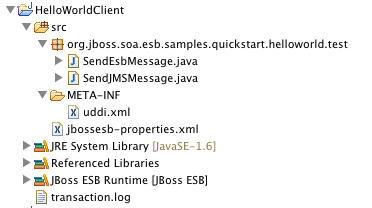

Check your source folders, to ensure that JDS did not exclude the META-INF folder. The next figure shows that no folder is excluded:


We will now run the SendEsbMessage class. Look at the arguments:


They match the service category and name that we defined in the server project, in the file jboss-esb.xml. You can also find them here: http://localhost:8080/contract/.


Once you run this, the JBoss console should display signs of your activity displaying a friendly "HelloESBWorld".

Thursday, December 1, 2011

The Composed Message Processor Pattern: Splitter, Router and Aggregator

The book Enterprise Integration Patterns, by of Gregor Hohpe & Bobby Woolf, introduces the Composed Message Processor Pattern. This pattern serves to send the same message to multiple modules (e.g., departments inside a company). To do this, the pattern has a splitter part, which gives an identifier (and more...) to each message, before routing multiple copies to different modules (e.g., the Widgets and the Gadgets departments) and reassembles the multiple messages again into a single one (the aggregator part), after the previous modules respond.

I hope they may forgive me for copying a picture of their book here:


With JBoss ESB, we have a number of "Out-of-the-box" actions that allow us to implement a pattern like this in a relatively simple way. The splitter and the router part work together in a single action. This action can be the StaticRouter or the ContentBasedRouter action (among others, like the WireTaps). All these are mentioned in the JBoss ESB "Programmers Guide". Later the aggregator waits for the right number of messages that were sent by the ContentBasedRouter, for instance, and returns a single message with all the messages it received in the attachment (it will timeout if some message does not arrive). Assume that the ContentBasedRouter sends two messages for the blue and green teams (none for the red one). Then, the green and the blue teams (e.g., Widget and Gadget Inventories if we want to stick to the figure) will take care of their copies of the messages and will forward their replies to the aggregator, which will consolidate the two messages, again, into a single one.

We are not going to see how to do a complete application like this, because it would strongly overlap with the following JBossESB samples: aggregator, fun_cbr, simple_cbr, static_router, jms_router and maybe wiretap. We will focus on how do these actions use the information that allows the aggregator to know exactly which messages it should pick. In the figure above that is the task of the splitter. In JBoss ESB many classes, like ContentBasedRouter, StaticRouter, etc., will add the following data, called "aggregatorTag" to the message:
- unique series id;
- message number inside the series;
- size of the series (i.e., how many messages exist);
- timestamp.

We can easily see that  after receiving a single message, the aggregator can determine how many more messages it should wait for and which other messages belong to this group (it can even know if it is receiving a duplicate message).

The next question is how can we manage this "aggregatorTag" in the JBoss ESB if we ever leave the bus. For instance, it is very likely that the message needs to enter some JMS queue (thus changing from its initial ESB format) to reenter later, after someone or some database checks the inventory. All we need to do is to take care of the aggregatorTag.

I suggest the following code for that:

Map<String, Object> outmap = new HashMap<String, Object>();
outmap.put("body", message.getBody().get());
outmap.put("ContextInfo", message.getContext().getContext("aggregatorTag"));
message.getBody().add(outmap);


This will store the current body of the ESB message and the aggregatorTag (which is in the context of the message) in a map and it will replace the current body of the ESB message with this map. After the action that performs this transformation, we can have another action that sends the message to a JMS queue. The JMSRouter action will not touch the body of the message, which will be visible in an external Java virtual machine (JVM):

 <action class="org.jboss.soa.esb.actions.routing.JMSRouter" name="routeToQueue">
<property name="connection-factory" value="ConnectionFactory" />
<property name="jndiName" value="queue/MyShop" />
<property name="unwrap" value="true" />
</action>

In the JVM, we will receive an ObjectMessageProxy, which contains an ObjectMessage, which contains a body with the map we prepared before. When the JVM is ready to reply, it can prepare a new JMS message (use the type ObjectMessage) and use a similar map scheme to make the reply and the tag enter the ESB world in the body of an ESB message. Then, on the ESB side, just before the aggregator action, we can have the following to put the body reply and the aggregatorTag back in their place:

Map<String, Object> map = (Map<String, Object>) message.getBody().get();
String body = (String) map.get("body");
message.getBody().add(body);
Object o = map.get("ContextInfo");
message.getContext().setContext("aggregatorTag", o);
In the end we have something like:

(service1) ContentBasedRouter --> (service2) request map creation (see code) --> out queue --> request map reading in the Java Virtual Machine --> JVM takes care of the request --> reply map creation in the JVM --> (service3) in queue to the ESB --> action to read the reply (see code) --> Aggregator.

Simple?

Thursday, November 24, 2011

How to Reply to a Different JBoss ESB Service

Assume that you have service S1 that cannot have the reply you need ready. Only service S2, which is invoked later by someone else, has the reply you need for service S1.

A very simple case where you may need this, but that you can solve differently: S1 starts a jBPM process orchestrator that does some actions and you want the client invoking S1 to block until the orchestrator has the results ready. Since S1 will not wait until the orchestrator finishes, you need the  orchestrator to call some service S2 to submit the results and somehow S2 should send the results back to the S1 client. In this case you can use the replyToOriginator tag in the ESBNotifier (see the Services Guide). Nevertheless, the following will also work.


Consider the other example I wrote here: Services with one-way requests (without reply) & how to reply later. You can see a couple of lines in the end that are supposed to send a message to the target you want:

LogicalEPR lepr = new LogicalEPR(message.getHeader().getCall().getReplyTo());
ServiceInvoker si = lepr.getServiceInvoker();
si.deliverAsync(message);

Unfortunately this solution will not work in all cases. The problem is in the address we get in the getReplyTo(). In the previous case this was a Logical End-Point, more precisely, the reply-to of the message pointed to the JBpmCallbackService. What if the reply-to address is a physical (?) end-point, say a queue? The previous three lines will simply not work (the first one will throw an exception).

To set the problem, let us see the following jboss-esb.xml.


<?xml version="1.0"?>

<jbossesb parameterReloadSecs="5"
xmlns="http://anonsvn.labs.jboss.com/labs/jbossesb/trunk/product/etc/schemas/xml/jbossesb-1.3.0.xsd"
xmlns:xsi="http://www.w3.org/2001/XMLSchema-instance"
xsi:schemaLocation="http://anonsvn.labs.jboss.com/labs/jbossesb/trunk/product/etc/schemas/xml/jbossesb-1.3.0.xsd http://anonsvn.jboss.org/repos/labs/labs/jbossesb/trunk/product/etc/schemas/xml/jbossesb-1.3.0.xsd">
<providers>
<jms-provider connection-factory="ConnectionFactory"
name="JMS">
<jms-bus busid="ReplyLaterGWChannel">
<jms-message-filter dest-name="queue/reply_later_Request_gw"
dest-type="QUEUE" />
</jms-bus>
<jms-bus busid="ReplyLaterEsbChannel">
<jms-message-filter dest-name="queue/reply_later_Request_esb"
dest-type="QUEUE" />
</jms-bus>
<jms-bus busid="ReplyLaterEsbChannel2">
<jms-message-filter dest-name="queue/reply_later_Request_esb2"
dest-type="QUEUE" />
</jms-bus>
</jms-provider>
</providers>
<services>
<service category="My_ReplyLater_Service"
description="Reply Late Service: Use this service to invoke the hello"
name="Hello">
<listeners>
<jms-listener busidref="ReplyLaterGWChannel"
is-gateway="true" name="JMS-Gateway" />
<jms-listener busidref="ReplyLaterEsbChannel" name="ESB-Listener" />
</listeners>
<actions mep="OneWay">
<action class="actions.MyListenerAction" name="helloaction"
process="hello" />
<action class="org.jboss.soa.esb.actions.SystemPrintln" name="printMessage">
<property name="message" value="JMS Secured Quickstart message" />
<property name="printfull" value="true" />
</action>

<action name="routeAction" class="org.jboss.soa.esb.actions.StaticRouter">
<property name="destinations">
<route-to destination-name="other-hello"
service-category="My_ReplyLater_Service" service-name="Hello2" />
</property>
</action>

<action class="actions.MyListenerAction" name="helloaction2"
process="hello2" />
</actions>
</service>
<service category="My_ReplyLater_Service"
description="Reply Late Service: Use this service to invoke the hello"
name="Hello2">
<listeners>
<jms-listener busidref="ReplyLaterEsbChannel2" name="ESB-Listener2" />
</listeners>
<actions mep="OneWay">
<action class="actions.MyListenerAction" name="helloaction3"
process="hello3" />
<action class="org.jboss.soa.esb.actions.SystemPrintln" name="printMessage">
<property name="message" value="JMS Secured Quickstart message" />
<property name="printfull" value="true" />
</action>
</actions>
</service>
</services>
</jbossesb>

We have two services:

  • My_ReplyLater_Service/Hello, has an helloaction to begin, a helloaction2 to finish (you will see that the service will never reach helloaction2) and prints the message in the middle, before routing it to  
  • My_ReplyLater_Service/Hello2. The My_ReplyLater_Service/Hello2 invokes helloaction3 and prints the message. 

A crucial point here is that both services are OneWay, i.e., they do not return results to their callers. In this demonstration, the client will invoke My_ReplyLater_Service/Hello synchronously, but will never get a reply, because the service is OneWay. Instead we will "manually" send the reply in the helloaction3, which belongs to a different service.


package actions;


import org.jboss.soa.esb.actions.AbstractActionLifecycle;
import org.jboss.soa.esb.addressing.EPR;
import org.jboss.soa.esb.addressing.MalformedEPRException;
import org.jboss.soa.esb.couriers.Courier;
import org.jboss.soa.esb.couriers.CourierException;
import org.jboss.soa.esb.couriers.CourierFactory;
import org.jboss.soa.esb.helpers.ConfigTree;
import org.jboss.soa.esb.message.Message;

public class MyListenerAction extends AbstractActionLifecycle
{

protected ConfigTree _config;

public MyListenerAction(ConfigTree config) {
_config = config; 

public Message hello(Message message) {
System.out.println("---------------------------------- hello ----------------------------------");
//String xmlEPR = EPRHelper.toXMLString(message.getHeader().getCall().getReplyTo());
//message.getBody().add("replyToAddress", xmlEPR);
System.out.println("-------------------------------- end hello --------------------------------");
return message;
}

public Message hello2(Message message) {
System.out.println("---------------------------------- hello 2 ----------------------------------");
System.out.println("-------------------------------- end hello 2 --------------------------------");
return null;
}

public Message hello3(Message message) throws CourierException, MalformedEPRException {
System.out.println("---------------------------------- hello 3 ----------------------------------");
System.out.println(message);
//String xml = (String) message.getBody().get("replyToAddress");
//EPR jmsepr = (EPR) EPRHelper.fromXMLString(xml);
EPR jmsepr = message.getHeader().getCall().getReplyTo();
message.getHeader().getCall().setTo(jmsepr);

Courier courier = CourierFactory.getCourier(jmsepr);
courier.deliver(message);
courier.cleanup();
System.out.println("-------------------------------- end hello 3 --------------------------------");

return null;
}

}

We get the JMS End-Point Representation from the first service and set the destination of the message using the setTo(). The destination of the message is the client that invoked the My_ReplyLater_Service/Hello service and provided a reply-to field in the message. Note that this is only possible, because this case is somewhat simple and uses only a single message. In other cases, we might need to store and retrieve the reply-to field using some other mechanism. I added in comments the code to do it in a separate body field of the message, using the EPRHelper class (in case the replyTo is changed somewhere).

The Courier class will do the hard work we need, because it accepts Physical EPRs (in fact, the ServiceInvoker also uses it). Unfortunately, the JBoss ESB documentation is very scarce in words about the Courier class. In fact, Courier is an interface. The true class behind this example is JmsCourier. I think that the name says it all: it uses JMS. The courier.cleanup() line will close the JMS MessageProducer (if not closed it may block other MessageProducers that try to write later to the same queue - I saw cases where the service would block without it).


Now, the other files. The deployment.xml:

<?xml version="1.0"?>

<jbossesb-deployment>
  <jmsQueue>reply_later_Request_gw</jmsQueue>
  <jmsQueue>reply_later_Request_esb</jmsQueue>
  <jmsQueue>reply_later_Request_esb2</jmsQueue>
  <jmsQueue>reply_later_Request_esb_reply</jmsQueue>
</jbossesb-deployment>

The jbm-queue-service.xml:


<?xml version="1.0" encoding="UTF-8"?>
<server>

<mbean code="org.jboss.jms.server.destination.QueueService"
name="jboss.esb.quickstart.destination:service=Queue,name=reply_later_Request_gw"
xmbean-dd="xmdesc/Queue-xmbean.xml">
<depends optional-attribute-name="ServerPeer">jboss.messaging:service=ServerPeer
</depends>
</mbean>
<mbean code="org.jboss.jms.server.destination.QueueService"
name="jboss.esb.quickstart.destination:service=Queue,name=reply_later_Request_esb"
xmbean-dd="xmdesc/Queue-xmbean.xml">
<depends optional-attribute-name="ServerPeer">jboss.messaging:service=ServerPeer
</depends>
</mbean>
<mbean code="org.jboss.jms.server.destination.QueueService"
name="jboss.esb.quickstart.destination:service=Queue,name=reply_later_Request_esb2"
xmbean-dd="xmdesc/Queue-xmbean.xml">
<depends optional-attribute-name="ServerPeer">jboss.messaging:service=ServerPeer
</depends>
</mbean>
<mbean code="org.jboss.jms.server.destination.QueueService"
name="jboss.esb.quickstart.destination:service=Queue,name=reply_later_Request_esb_reply"
xmbean-dd="xmdesc/Queue-xmbean.xml">
<depends optional-attribute-name="ServerPeer">jboss.messaging:service=ServerPeer
</depends>
</mbean>
</server>

This is how the ESB project looks like in my JBoss Developer Studio:


Now, to synchronously invoke the Hello service, refer to my other message, and use the following arguments:

My_ReplyLater_Service Hello "my text goes here"

In the end you may want to print the contents of the message like this:

System.out.println("I said: " + reply.getBody().get());